| 1 | # Sipp |
| 2 | |
| 3 | 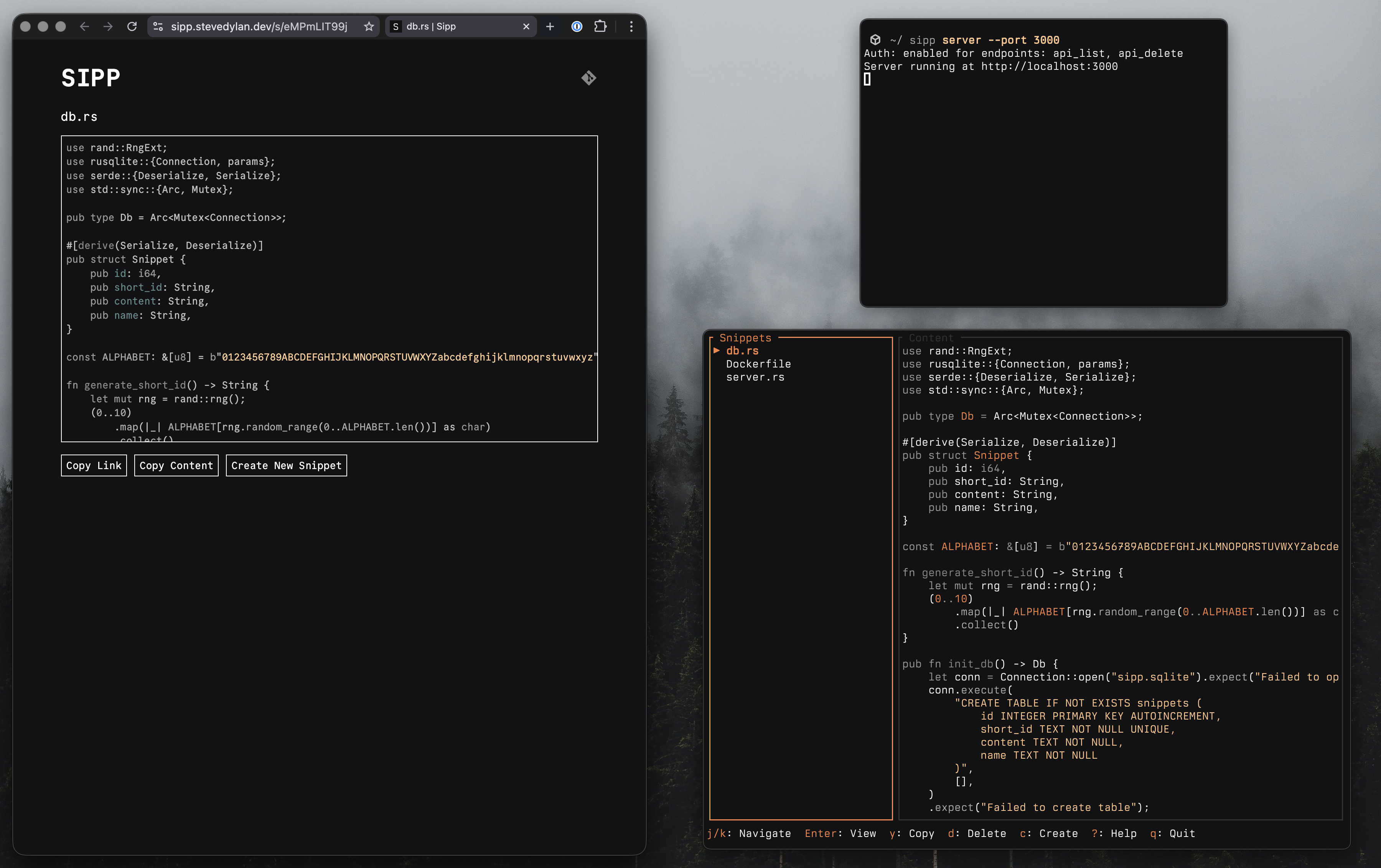 |
| 4 | |
| 5 | Minimal code sharing |
| 6 | |
| 7 | ## Features |
| 8 | |
| 9 | - Single binary for web server and TUI |
| 10 | - Create snippets and share on the web |
| 11 | - Raw output for CLI tools — `curl`, `wget`, and `httpie` get plain text automatically |
| 12 | - Interactive TUI with authenticated access for snippet management |
| 13 | - Minimal, fast, and low memory consumption |
| 14 | |
| 15 | ## Quickstart |
| 16 | |
| 17 | **1. Install** |
| 18 | |
| 19 | Install via the [releases](https://github.com/stevedylandev/sipp/releases) page, or directly with `cargo` |
| 20 | |
| 21 | ```bash |
| 22 | cargo install sipp-so |
| 23 | ``` |
| 24 | |
| 25 | To confirm it was installed correctly run the following |
| 26 | |
| 27 | ```bash |
| 28 | sipp --help |
| 29 | ``` |
| 30 | |
| 31 | **2. Start Server** |
| 32 | |
| 33 | For demo purposes you can run this locally, but ideally this would be run in a deployment server with a proper ENV setup with your admin key. |
| 34 | |
| 35 | ```bash |
| 36 | sipp server --port 3000 |
| 37 | ``` |
| 38 | |
| 39 | **3. Create a Snippet** |
| 40 | |
| 41 | You can either open up `http://localhost:3000` and create a snippet in a web browser, or use the TUI. In the same directory, open a new terminal window and use |
| 42 | |
| 43 | ```bash |
| 44 | # Path to file |
| 45 | sipp path/to/file.rs |
| 46 | |
| 47 | # Or use the interactive tui |
| 48 | sipp |
| 49 | ``` |
| 50 | |
| 51 | ## Demo Instance |
| 52 | |
| 53 | A small instance running at [sipp.so](https://sipp.so) that can be used for testing and demo purposes. |
| 54 | |
| 55 | ```bash |
| 56 | sipp -r https://sipp.so |
| 57 | ``` |
| 58 | |
| 59 | >[!WARNING] |
| 60 | >All snippets created here are public and might be deleted at any time; host your own instance with your own API key for personal use! |
| 61 | |
| 62 | ## Install |
| 63 | |
| 64 | Sipp can be installed several ways |
| 65 | |
| 66 | ### Releases |
| 67 | |
| 68 | Visit the [releases](https://github.com/stevedylandev/sipp/releases) page and install through cURL script and other methods. |
| 69 | |
| 70 | ### Homebrew |
| 71 | |
| 72 | ``` |
| 73 | brew install stevedylandev/tap/sipp-so |
| 74 | ``` |
| 75 | |
| 76 | ### Cargo |
| 77 | |
| 78 | ```bash |
| 79 | cargo install sipp-so |
| 80 | ``` |
| 81 | |
| 82 | ## Usage |
| 83 | |
| 84 | ### CLI |
| 85 | |
| 86 | ``` |
| 87 | sipp [OPTIONS] [FILE] [COMMAND] |
| 88 | ``` |
| 89 | |
| 90 | #### Commands |
| 91 | |
| 92 | | Command | Description | |
| 93 | |---|---| |
| 94 | | `server` | Start the web server | |
| 95 | | `tui` | Launch the interactive TUI | |
| 96 | | `auth` | Save remote URL and API key to config file | |
| 97 | |
| 98 | #### Arguments |
| 99 | |
| 100 | | Argument | Description | |
| 101 | |---|---| |
| 102 | | `[FILE]` | File path to create a snippet from | |
| 103 | |
| 104 | #### Options |
| 105 | |
| 106 | | Option | Description | |
| 107 | |---|---| |
| 108 | | `-r, --remote <URL>` | Remote server URL (e.g. `http://localhost:3000`) (env: `SIPP_REMOTE_URL`) | |
| 109 | | `-k, --api-key <KEY>` | API key for authenticated operations (env: `SIPP_API_KEY`) | |
| 110 | |
| 111 | ### Server |
| 112 | |
| 113 | Sipp includes a built-in web server powered by Axum. Start it with: |
| 114 | |
| 115 | ```bash |
| 116 | sipp server --port 3000 --host localhost |
| 117 | ``` |
| 118 | |
| 119 | #### Environment Variables |
| 120 | |
| 121 | | Variable | Description | |
| 122 | |---|---| |
| 123 | | `SIPP_API_KEY` | API key for protecting endpoints | |
| 124 | | `SIPP_AUTH_ENDPOINTS` | Comma-separated list of endpoints requiring auth: `api_list`, `api_create`, `api_get`, `api_delete`, `all`, or `none` (defaults to `api_delete,api_list`) | |
| 125 | | `SIPP_MAX_CONTENT_SIZE` | Maximum snippet content size in bytes (defaults to `512000` / 500 KB) | |
| 126 | | `SIPP_DB_PATH` | Custom path for the SQLite database file (defaults to `sipp.sqlite` in the working directory) | |
| 127 | |
| 128 | The server stores snippets in a local `sipp.sqlite` SQLite database. |
| 129 | |
| 130 | #### API Endpoints |
| 131 | |
| 132 | | Method | Endpoint | Description | |
| 133 | |---|---|---| |
| 134 | | `GET` | `/api/snippets` | List all snippets | |
| 135 | | `POST` | `/api/snippets` | Create a snippet (`{"name": "...", "content": "..."}`) | |
| 136 | | `GET` | `/api/snippets/{short_id}` | Get a snippet by ID | |
| 137 | | `PUT` | `/api/snippets/{short_id}` | Update a snippet (`{"name": "...", "content": "..."}`) | |
| 138 | | `DELETE` | `/api/snippets/{short_id}` | Delete a snippet by ID | |
| 139 | |
| 140 | Authenticated endpoints require an `x-api-key` header. |
| 141 | |
| 142 | #### Raw Output for CLI Tools |
| 143 | |
| 144 | When you access a snippet URL (`/s/{short_id}`) with `curl`, `wget`, or `httpie`, the server returns the raw content as plain text instead of HTML: |
| 145 | |
| 146 | ```bash |
| 147 | curl https://sipp.so/s/abc123 |
| 148 | ``` |
| 149 | |
| 150 | ### TUI |
| 151 | |
| 152 | The Sipp TUI makes it easy to create, copy, share, and manage your snippets either locally or remotely. Launch it with: |
| 153 | |
| 154 | ```bash |
| 155 | # Launch TUI (default behavior when no file argument is given) |
| 156 | sipp |
| 157 | |
| 158 | # Or explicitly |
| 159 | sipp tui |
| 160 | |
| 161 | # With remote options |
| 162 | sipp -r https://sipp.so -k your-api-key |
| 163 | ``` |
| 164 | |
| 165 | #### Local Access |
| 166 | |
| 167 | If you are running `sipp` in the same directory as the `sipp.sqlite` file created by the server instance, the TUI will automatically access the datebase locally and you can edit it directly. |
| 168 | |
| 169 | #### Remote Access |
| 170 | |
| 171 | To access a remote instance of Sipp make sure to do the following: |
| 172 | - Set the `SIPP_API_KEY` variable in your server instance |
| 173 | - Run `sipp auth` to enter in your server instance URL and the API key, which will be stored under `$HOME/.config/sipp`. You can also set these with the ENV variables `SIPP_REMOTE_URL` and `SIPP_API_KEY` |
| 174 | |
| 175 | >[!NOTE] |
| 176 | >You can try a limited remote instance without an API key with `sipp -r https://sipp.so` |
| 177 | |
| 178 | #### Actions |
| 179 | |
| 180 | While inside the TUI the following actions are available |
| 181 | |
| 182 | | Key | Action | |
| 183 | |---|---| |
| 184 | | `j`/`↓` | Move down / Scroll down | |
| 185 | | `k`/`↑` | Move up / Scroll up | |
| 186 | | `Enter` | Focus content pane | |
| 187 | | `Esc` | Back / Quit | |
| 188 | | `y` | Copy snippet content | |
| 189 | | `Y` | Copy snippet link | |
| 190 | | `o` | Open in browser | |
| 191 | | `e` | Edit snippet | |
| 192 | | `d` | Delete snippet | |
| 193 | | `c` | Create snippet | |
| 194 | | `/` | Search snippets | |
| 195 | | `r` | Refresh snippets (remote only) | |
| 196 | | `q` | Quit | |
| 197 | | `?` | Toggle help | |
| 198 | |
| 199 | ## Deployment |
| 200 | |
| 201 | Since Sipp is a single binary it can be run in virtually any enviornment. |
| 202 | |
| 203 | ### Systemd |
| 204 | |
| 205 | Create a service file at `/etc/systemd/system/sipp.service`: |
| 206 | |
| 207 | ```ini |
| 208 | [Unit] |
| 209 | Description=Sipp snippet server |
| 210 | After=network.target |
| 211 | |
| 212 | [Service] |
| 213 | ExecStart=/usr/local/bin/sipp server --port 3000 --host 0.0.0.0 |
| 214 | Environment=SIPP_API_KEY=your-secret-key |
| 215 | WorkingDirectory=/var/lib/sipp |
| 216 | Restart=on-failure |
| 217 | |
| 218 | [Install] |
| 219 | WantedBy=multi-user.target |
| 220 | ``` |
| 221 | |
| 222 | ```bash |
| 223 | sudo systemctl enable --now sipp |
| 224 | ``` |
| 225 | |
| 226 | ### Docker |
| 227 | |
| 228 | A `Dockerfile` and `docker-compose.yml` are included in the repository. |
| 229 | |
| 230 | ```bash |
| 231 | # Using Docker Compose (recommended) |
| 232 | SIPP_API_KEY=your-secret-key docker compose up -d |
| 233 | |
| 234 | # Or build and run manually |
| 235 | docker build -t sipp . |
| 236 | docker run -p 3000:3000 -e SIPP_API_KEY=your-secret-key -v sipp-data:/data sipp |
| 237 | ``` |
| 238 | |
| 239 | ### Railway |
| 240 | |
| 241 | 1. Fork this repo and connect your fork to [Railway](https://railway.app) |
| 242 | 2. Set the environment variables `SIPP_API_KEY` and optionally `SIPP_AUTH_ENDPOINTS` |
| 243 | 3. Add a [volume](https://docs.railway.com/guides/volumes) to your service and mount it at `/data` |
| 244 | 4. Set `SIPP_DB_PATH` to `/data/sipp.sqlite` so the database persists across deploys |