| 1 | --- |
| 2 | title: "How to Offset Your NFT Project Carbon Emissions with Aerial" |
| 3 | publishDate: "22 Apr 2022" |
| 4 | description: "Learn how Aerial is helping make NFTs carbon neutral with their emissions API" |
| 5 | tags: ["web3", "nfts", "tutorials", "web development", "tech philosophy"] |
| 6 | ogImage: "https://miro.medium.com/v2/resize:fit:4800/format:webp/1*KxoVDEZFH3mJrlfeguMYjg.jpeg" |
| 7 | --- |
| 8 | import { Image } from "@astrojs/image/components"; |
| 9 | import medium from "../../assets/medium.png" |
| 10 | import OutLinkButton from "../../components/OutLinkButton.astro" |
| 11 | |
| 12 | <OutLinkButton link="https://medium.com/pinata/how-to-offset-your-nft-project-carbon-emissions-with-aerial-b5b4b95faba0" site="Medium" image={medium} /> |
| 13 | |
| 14 | |
| 15 | As a believer in NFTs and Web3, I am always ecstatic to see what can be done with this new technology. I get bullish over new projects, experimental ideas, and cutting edge utility (especially when it’s something we make at Pinata like [Submarine.me](https://submarine.me)). However, I don’t look at this Metaverse with rose colored glasses. There are many imperfections in this space, and one of the worst ones is environmental impact. |
| 16 | |
| 17 | While I love dooting around on my computer, I also love the outdoors. I love hiking, seeing mountains, hearing rivers, and smelling wildflowers. I love hearing birds in the morning and geese at night. I love to watch my son experience nature and get excited over a butterfly. So yeah, it kinda kills me to think of how this wonderful industry of crypto can harm this amazing planet. |
| 18 | |
| 19 | <Image |
| 20 | src="https://cdn-images-1.medium.com/max/2400/1*xQEP67xsPsQ4vU7wjKLFBw.png" |
| 21 | alt="ethereum carbon emissions chart" |
| 22 | width={1920} |
| 23 | aspectRatio={16/9} |
| 24 | /> |
| 25 | |
| 26 | The energy consumed by proof of work blockchains is staggering. It’s no secret, and if we want to enjoy this planet we need to accept it. I know I feel defensive when someone attacks something I enjoy, but it helps to take a deep breath and ask the big questions: “could I be wrong?” If crypto is putting the planet in danger, what do we do? |
| 27 | |
| 28 | It might sound easy to just throw Web3 out the window and call it a day, but as with most technological advances, the cat is out of the bag. There’s no putting the lid back on Pandora’s box. In my opinion, there is no easy fix to this problem. There will be a need for multiple approaches to help offset our carbon footprint, including but not limited to better blockchain mechanisms and organizations that pursue renewable energy and conservation. |
| 29 | |
| 30 | This is where [Aerial](https://aerial.is/) steps in. Aerial is a sustainability platform that helps users track their carbon footprint and make donations to help offset their carbon footprint. They are known for their beautiful [mobile application](https://aerial.is/download), but more recently they have developed an API that can track and estimate the carbon footprint of NFT projects and crypto! Per their website, “Emissions are calculated based on the energy consumption of the [Ethereum network](http://ethereumenergyconsumption.com/) and the average [gas used](https://etherscan.io/chart/gasused) per transaction.” Since [Pinata](https://pinata.cloud/) is the home of NFT media we want to always support initiatives like this to make NFTs more sustainable! |
| 31 | |
| 32 | They have some awesome and simple ways you can integrate their widget to your website that looks something like this: |
| 33 | |
| 34 | ```javascript |
| 35 | <iframe src="https://www.aerial.is/nft/embed?address=0x3e88721fa41d5e102d54b4a04e550222efdd234d"> |
| 36 | ``` |
| 37 | |
| 38 | <Image |
| 39 | src="https://cdn-images-1.medium.com/max/2000/1*IPAefM4T_NiRygdri_DzhA.png" |
| 40 | alt="screenshot of widget" |
| 41 | width={1920} |
| 42 | aspectRatio={6/2} |
| 43 | /> |
| 44 | |
| 45 | |
| 46 | In this post we’ll take their API a step further and build our own custom widget. We can use it in our frontend website that displays more details about the project’s emissions with the goal of making visitors more aware! |
| 47 | |
| 48 | If you want to follow along for this tutorial, you’ll need to have npm installed and be familiar with a frontend framework like React. First thing we’ll do is create a new React app and CD into it. |
| 49 | |
| 50 | ```bash |
| 51 | npx create-react-app aerial-component |
| 52 | |
| 53 | cd aerial-component && npm start |
| 54 | ``` |
| 55 | |
| 56 | Then we’ll delete the CSS files and boilerplate so we are left with this in App.js |
| 57 | |
| 58 | ```javascript |
| 59 | function App() { |
| 60 | return ( |
| 61 | <div className="App"> |
| 62 | </div> |
| 63 | ); |
| 64 | } |
| 65 | |
| 66 | export default App; |
| 67 | ``` |
| 68 | |
| 69 | Now let’s make a new component. Create a new file in the src folder called Aerial.js and fill it with this starter code |
| 70 | |
| 71 | ```javascript |
| 72 | const Aerial = () => { |
| 73 | return ( |
| 74 | <h1>Aerial</h1> |
| 75 | ) |
| 76 | } |
| 77 | |
| 78 | export default Aerial; |
| 79 | |
| 80 | ``` |
| 81 | |
| 82 | Now let’s import the new component to our App.js |
| 83 | |
| 84 | |
| 85 | ```javascript |
| 86 | import Aerial from "./Aerial" |
| 87 | |
| 88 | function App() { |
| 89 | return ( |
| 90 | <div className="App"> |
| 91 | <Aerial /> |
| 92 | </div> |
| 93 | ); |
| 94 | } |
| 95 | |
| 96 | export default App; |
| 97 | ``` |
| 98 | |
| 99 | If you run npm start you should see your basic app with “Aerial” in the top left! |
| 100 | |
| 101 | Now that we have our new component ready to go, we need to start making some API calls and fetching the data. If you need a reference for how to use Aerial’s API you can see their reference [here](https://www.notion.so/aerial/Aerial-API-343ebee875784ca18c244a5aae9fa7d3). |
| 102 | |
| 103 | It’s really quite easy, all we have to do to fetch some basic data is use the following format |
| 104 | |
| 105 | ``` |
| 106 | GET https://aerial.is/_nft/<address> |
| 107 | ``` |
| 108 | |
| 109 | This will return data in the following format |
| 110 | |
| 111 | ```json |
| 112 | { |
| 113 | "co2": <emissions in CO2>, |
| 114 | "gas": <gas used>, |
| 115 | "transactions": <number of transactions>, |
| 116 | "credits": <credits required to offset>, |
| 117 | "cost": <cost to offset in USD>, |
| 118 | "credits_purchased": <number of credits already purchased>, |
| 119 | "transactions_offset": <number of transactions already offset> |
| 120 | } |
| 121 | ``` |
| 122 | |
| 123 | So let’s give it a shot! First thing we need to do is install Axios to help us with our API calls. Go back to the terminal and run |
| 124 | |
| 125 | ```bash |
| 126 | npm install axios |
| 127 | ``` |
| 128 | |
| 129 | Now make sure to import it into the top of our Aerial component like so |
| 130 | |
| 131 | ```javascript |
| 132 | import axios from "axios" |
| 133 | ``` |
| 134 | |
| 135 | Now we’re going to make a quick function that will get the data. For our example we’re going to use the NFT contract address 0x2acab3dea77832c09420663b0e1cb386031ba17b. |
| 136 | |
| 137 | ```javascript |
| 138 | const getEmissionsData = async () => { |
| 139 | try{ |
| 140 | const response = await axios.get("https://aerial.is/_nft/0x2acab3dea77832c09420663b0e1cb386031ba17b") |
| 141 | console.log(response.data) |
| 142 | } catch (error) { |
| 143 | console.log(error) |
| 144 | } |
| 145 | } |
| 146 | ``` |
| 147 | |
| 148 | To run this function we’ll use the useEffect hook to fetch the data as we load the app. To do that we simply need to import it at the top like so |
| 149 | |
| 150 | ```javascript |
| 151 | import { useEffect } from "react"; |
| 152 | ``` |
| 153 | |
| 154 | Then we need to run the function inside useEffect, |
| 155 | |
| 156 | ```javascript |
| 157 | useEffect(()=> { |
| 158 | getEmissionsData() |
| 159 | }, []) |
| 160 | ``` |
| 161 | |
| 162 | This is what our code will look like with everything in place: |
| 163 | |
| 164 | ```javascript |
| 165 | |
| 166 | import { useEffect } from "react"; |
| 167 | import axios from "axios"; |
| 168 | |
| 169 | const Aerial = () => { |
| 170 | |
| 171 | const getEmissionsData = async () => { |
| 172 | try{ |
| 173 | const response = await axios.get("https://aerial.is/_nft/0x2acab3dea77832c09420663b0e1cb386031ba17b") |
| 174 | console.log(response.data) |
| 175 | } catch (error) { |
| 176 | console.log(error) |
| 177 | } |
| 178 | } |
| 179 | |
| 180 | useEffect(()=> { |
| 181 | getEmissionsData() |
| 182 | }, []) |
| 183 | |
| 184 | return ( |
| 185 | <div className="aerial-container"> |
| 186 | <h1>Aerial</h1> |
| 187 | </div> |
| 188 | ) |
| 189 | } |
| 190 | |
| 191 | export default Aerial; |
| 192 | ``` |
| 193 | |
| 194 | If we run the app and check the dev console, we can see our data! |
| 195 | |
| 196 | <Image |
| 197 | src="https://cdn-images-1.medium.com/max/2000/1*UrdopTgDhErJObLI3V8DwQ.png" |
| 198 | alt="dev tools" |
| 199 | width={1920} |
| 200 | aspectRatio={16/4} |
| 201 | /> |
| 202 | |
| 203 | Now that we have the data, it’s as simple as displaying it so users on our website can see it! |
| 204 | |
| 205 | To store the data we’ll import the useState hook at the top of our app along with useEffect |
| 206 | |
| 207 | ```javascript |
| 208 | import { useEffect, useState } from "react" |
| 209 | ``` |
| 210 | |
| 211 | Then right above our function to grab the data, we’ll declare our state variable as an empty array where we can push stuff in later. |
| 212 | |
| 213 | ```javascript |
| 214 | const [emissionsData, setEmissionsData] = useState([]) |
| 215 | ``` |
| 216 | |
| 217 | Now all we have to do is edit our function just a little bit to push that data into our state using the “setEmissionsData”! Here is our function now |
| 218 | |
| 219 | ```javascript |
| 220 | const getEmissionsData = async () => { |
| 221 | try{ |
| 222 | const response = await axios.get("https://aerial.is/_nft/0x2acab3dea77832c09420663b0e1cb386031ba17b") |
| 223 | console.log(response.data) |
| 224 | setEmissionsData(response.data) |
| 225 | } catch (error) { |
| 226 | console.log(error) |
| 227 | } |
| 228 | } |
| 229 | ``` |
| 230 | |
| 231 | The next thing we’re gonna do is create two components inside our file, one as a loading indicator, and the other as the data we want to display. To do this we’ll just make two more functions like this |
| 232 | |
| 233 | ```javascript |
| 234 | const loading = () => ( |
| 235 | <div className="loading-container"> |
| 236 | <h1>Loading</h1> |
| 237 | </div> |
| 238 | ) |
| 239 | |
| 240 | const emissionsComponent = () => { |
| 241 | |
| 242 | return ( |
| 243 | <div className="data-container"> |
| 244 | <h1>Data goes here</h1> |
| 245 | </div> |
| 246 | ) |
| 247 | } |
| 248 | ``` |
| 249 | |
| 250 | To switch between the two we’ll create a new state called “isLoading” right underneath our previous state. We’ll set the default value to “false” for now |
| 251 | |
| 252 | ```javascript |
| 253 | const [emissionsData, setEmissionsData] = useState([]) |
| 254 | const [isLoading, setIsLoading] = useState(false) |
| 255 | ``` |
| 256 | |
| 257 | Back in our getEmissionsData function we need to turn the “loading” on when we start the request, and then off when we’re done. |
| 258 | |
| 259 | ```javascript |
| 260 | const getEmissionsData = async () => { |
| 261 | try{ |
| 262 | setIsLoading(true) |
| 263 | const response = await axios.get("https://aerial.is/_nft/0x2acab3dea77832c09420663b0e1cb386031ba17b") |
| 264 | console.log(response.data) |
| 265 | setEmissionsData(response.data) |
| 266 | setIsLoading(false) |
| 267 | } catch (error) { |
| 268 | console.log(error) |
| 269 | } |
| 270 | } |
| 271 | ``` |
| 272 | |
| 273 | Finally, way down at the bottom where we render the whole app, we’ll add in some conditional rendering to say “display the loading component while loading, then display the data component when not loading.” |
| 274 | |
| 275 | ```javascript |
| 276 | return ( |
| 277 | <div className="aerial-container"> |
| 278 | {isLoading ? loading() : emissionsComponent()} |
| 279 | </div> |
| 280 | ) |
| 281 | ``` |
| 282 | |
| 283 | As a quick recap this is what our component looks like at the moment |
| 284 | |
| 285 | ```javascript |
| 286 | import { useState, useEffect } from "react" |
| 287 | import axios from "axios" |
| 288 | |
| 289 | const Aerial = () => { |
| 290 | |
| 291 | const [emissionsData, setEmissionsData] = useState([]) |
| 292 | const [isLoading, setIsLoading] = useState(false) |
| 293 | |
| 294 | const getEmissionsData = async () => { |
| 295 | try{ |
| 296 | setIsLoading(true) |
| 297 | const response = await axios.get("https://aerial.is/_nft/0x2acab3dea77832c09420663b0e1cb386031ba17b") |
| 298 | console.log(response.data) |
| 299 | setEmissionsData(response.data) |
| 300 | setIsLoading(false) |
| 301 | } catch (error) { |
| 302 | console.log(error) |
| 303 | } |
| 304 | } |
| 305 | |
| 306 | const loading = () => ( |
| 307 | <div className="loading-container"> |
| 308 | <h1>Loading</h1> |
| 309 | </div> |
| 310 | ) |
| 311 | |
| 312 | const emissionsComponent = () => { |
| 313 | |
| 314 | return ( |
| 315 | <div className="data-container"> |
| 316 | <h1>Data goes here</h1> |
| 317 | </div> |
| 318 | ) |
| 319 | } |
| 320 | |
| 321 | |
| 322 | useEffect(()=> { |
| 323 | getEmissionsData() |
| 324 | }, []) |
| 325 | |
| 326 | return ( |
| 327 | <div className="aerial-container"> |
| 328 | {isLoading ? loading() : emissionsComponent()} |
| 329 | </div> |
| 330 | ) |
| 331 | } |
| 332 | |
| 333 | export default Aerial; |
| 334 | ``` |
| 335 | |
| 336 | Ok now the good part! Time to parse that data and display it. We’re going to go over a few of the pieces of data and how you may want to display them. |
| 337 | |
| 338 | The first is the CO2 emissions, which the API returns as a raw number in the unit of Kg. The best way to make this number manageable in my opinion is to round up the number, and use some javascript to add the commas for each three digits. So back in our emissionsComponent, I have declared the following variable from our saved state. |
| 339 | |
| 340 | ```javascript |
| 341 | const co2 = new Intl.NumberFormat().format(Math.round(emissionsData.co2)) |
| 342 | ``` |
| 343 | |
| 344 | Next up is the gas used for this project, and for this one it returns a whole number so no need to round it up. We’ll just format it to be readable. |
| 345 | |
| 346 | ```javascript |
| 347 | const gas = new Intl.NumberFormat().format(emissionsData.gas) |
| 348 | ``` |
| 349 | |
| 350 | Aerial of course also provides their unit for donations to offset the carbon emissions they call “credits.” The API can return the total credits need to make the NFT project carbon neutral, how many are purchased so far, and how much it would cost in total to offset the project in USD. To make this data more readable, we want to display how many credits have been purchased, how many are needed to offset, and how much it would cost to completely offset the project. We just need a little math to make that happen! |
| 351 | |
| 352 | For the credits remaining, we just need to subtract the credits already purchased from the total credits needed to offset like so. |
| 353 | |
| 354 | ```javascript |
| 355 | const creditsRemaining = new Intl.NumberFormat().format(emissionsData.credits - emissionsData.credits_purchased) |
| 356 | ``` |
| 357 | |
| 358 | Of course we want to display how many have already purchased and that’s pretty simple. |
| 359 | |
| 360 | ```javascript |
| 361 | const creditsPurchased = new Intl.NumberFormat().format(emissionsData.credits_purchased) |
| 362 | ``` |
| 363 | |
| 364 | Now the more complicated part is calculating how much the remaining cost is. The API gives us the total cost, but it does not include how much has been spent. So for us to get this number we need to divide the emissions cost with the total credits needed to offset, then multiply that against the total emissions credits minus the credits already purchased. In the end it looks like this! |
| 365 | |
| 366 | ```javascript |
| 367 | const cost = new Intl.NumberFormat().format((emissionsData.cost / emissionsData.credits) * (emissionsData.credits - emissionsData.credits_purchased)) |
| 368 | ``` |
| 369 | |
| 370 | Lastly, we want the number of total number of transactions already offset. |
| 371 | |
| 372 | ``` |
| 373 | const transactions = new Intl.NumberFormat().format(emissionsData.transactions) |
| 374 | ``` |
| 375 | |
| 376 | Alright that was a bit of work to get sorted, but now we can easily plug this into our emissionsComponent so people can see the data in a more easy to read format. We’re also going to display this in a nice grid with each data cell in a box, so our code inside emissions is going to look like this. |
| 377 | |
| 378 | ```javascript |
| 379 | return ( |
| 380 | <div className="data-container"> |
| 381 | <div className="header"> |
| 382 | <h1>Deadfellaz Carbon Offset</h1> |
| 383 | </div> |
| 384 | <div className="data-grid"> |
| 385 | <div className="data-cell"> |
| 386 | <h2>{co2} Kg</h2> |
| 387 | <h3>CO2 Emissions</h3> |
| 388 | </div> |
| 389 | <div className="data-cell"> |
| 390 | <h2>{gas}</h2> |
| 391 | <h3>Gas Used</h3> |
| 392 | </div> |
| 393 | <div className="data-cell"> |
| 394 | <h2>{transactions}</h2> |
| 395 | <h3>Transactions</h3> |
| 396 | </div> |
| 397 | <div className="data-cell"> |
| 398 | <h2>${cost}</h2> |
| 399 | <h3>Cost to Offset</h3> |
| 400 | </div> |
| 401 | <div className="data-cell"> |
| 402 | <h2>{creditsRemaining}</h2> |
| 403 | <h3>Credits needed to offset</h3> |
| 404 | </div> |
| 405 | <div className="data-cell"> |
| 406 | <h2>{creditsPurchased}</h2> |
| 407 | <h3>Credits Purchased so Far</h3> |
| 408 | </div> |
| 409 | </div> |
| 410 | <a className="cta-button" target="_blank" rel="noreferrer" href="https://aerial.is/nft/0x2acab3dea77832c09420663b0e1cb386031ba17b">Offset</a> |
| 411 | </div> |
| 412 | ) |
| 413 | ``` |
| 414 | |
| 415 | At the bottom we’ve also added a button where a user can click on it and be directed to Aerials page for that particular NFT project, where they can make purchase credits to help offset that project. |
| 416 | |
| 417 | To make this whole component feel clean as well as themed for the project, we took some colors and styled from DeadFellaz and added it to this page with some CSS; we also added a fun Lottie animation for the loading component instead of just a header that says loading. In the end our code looks like this! |
| 418 | |
| 419 | ```javascript |
| 420 | import { useState, useEffect } from "react" |
| 421 | import "./Aerial.css" |
| 422 | import axios from "axios"; |
| 423 | import Lottie from "react-lottie" |
| 424 | import co2 from "./co2.json" |
| 425 | |
| 426 | |
| 427 | const Aerial = () => { |
| 428 | |
| 429 | const [emissionsData, setEmissionsData] = useState([]) |
| 430 | const [isLoading, setIsLoading] = useState(false) |
| 431 | |
| 432 | const getEmissionsData = async () => { |
| 433 | try{ |
| 434 | setIsLoading(true) |
| 435 | const response = await axios.get("https://aerial.is/_nft/0x2acab3dea77832c09420663b0e1cb386031ba17b") |
| 436 | console.log(response.data) |
| 437 | setEmissionsData(response.data) |
| 438 | setIsLoading(false) |
| 439 | } catch (error) { |
| 440 | console.log(error) |
| 441 | } |
| 442 | } |
| 443 | |
| 444 | const loading = () => ( |
| 445 | <div className="loading-container"> |
| 446 | <Lottie options={{animationData: co2}} height={400} width={400} /> |
| 447 | </div> |
| 448 | ) |
| 449 | |
| 450 | const emissionsComponent = () => { |
| 451 | |
| 452 | const co2 = new Intl.NumberFormat().format(Math.round(emissionsData.co2)) |
| 453 | const gas = new Intl.NumberFormat().format(emissionsData.gas) |
| 454 | const creditsRemaining = new Intl.NumberFormat().format(emissionsData.credits - emissionsData.credits_purchased) |
| 455 | const creditsPurchased = new Intl.NumberFormat().format(emissionsData.credits_purchased) |
| 456 | const cost = new Intl.NumberFormat().format((emissionsData.cost / emissionsData.credits) * (emissionsData.credits - emissionsData.credits_purchased)) |
| 457 | const transactions = new Intl.NumberFormat().format(emissionsData.transactions) |
| 458 | |
| 459 | return ( |
| 460 | <div className="data-container"> |
| 461 | <div className="header"> |
| 462 | <h1>Deadfellaz Carbon Offset</h1> |
| 463 | </div> |
| 464 | <div className="data-grid"> |
| 465 | <div className="data-cell"> |
| 466 | <h2>{co2} Kg</h2> |
| 467 | <h3>CO2 Emissions</h3> |
| 468 | </div> |
| 469 | <div className="data-cell"> |
| 470 | <h2>{gas}</h2> |
| 471 | <h3>Gas Used</h3> |
| 472 | </div> |
| 473 | <div className="data-cell"> |
| 474 | <h2>{transactions}</h2> |
| 475 | <h3>Transactions</h3> |
| 476 | </div> |
| 477 | <div className="data-cell"> |
| 478 | <h2>${cost}</h2> |
| 479 | <h3>Cost to Offset</h3> |
| 480 | </div> |
| 481 | <div className="data-cell"> |
| 482 | <h2>{creditsRemaining}</h2> |
| 483 | <h3>Credits needed to offset</h3> |
| 484 | </div> |
| 485 | <div className="data-cell"> |
| 486 | <h2>{creditsPurchased}</h2> |
| 487 | <h3>Credits Purchased so Far</h3> |
| 488 | </div> |
| 489 | </div> |
| 490 | <a className="cta-button" target="_blank" rel="noreferrer" href="https://aerial.is/nft/0x2acab3dea77832c09420663b0e1cb386031ba17b">Offset</a> |
| 491 | </div> |
| 492 | ) |
| 493 | } |
| 494 | |
| 495 | |
| 496 | useEffect(()=> { |
| 497 | getEmissionsData() |
| 498 | }, []) |
| 499 | |
| 500 | return ( |
| 501 | <div className="aerial-container"> |
| 502 | {isLoading ? loading() : emissionsComponent()} |
| 503 | </div> |
| 504 | ) |
| 505 | } |
| 506 | |
| 507 | export default Aerial; |
| 508 | ``` |
| 509 | |
| 510 | Here is a quick preview of our final project |
| 511 | |
| 512 | 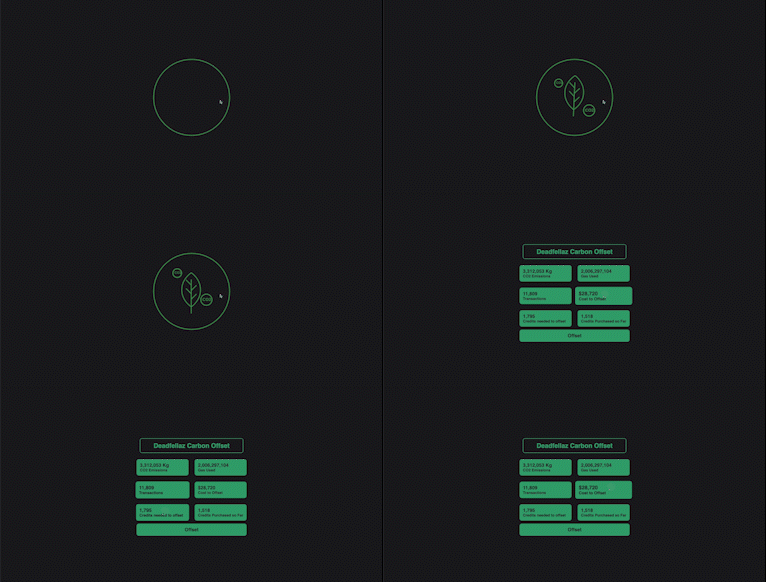 |
| 513 | |
| 514 | You can actually view the working component live [here](https://aerial-component.vercel.app/), and you can freely download the repo on [GitHub](https://github.com/stevedsimkins/aerial-component)! |
| 515 | |
| 516 | If you wanted to take this step further you can request an API key from Aerial to use their offsetting endpoints. These let you not only fetch the data, but also provide a way to make a payment for the credits with Stripe or even Coinbase if you have merchant accounts with both of them! In the end it will always be a little easier to redirect users to Aerial.is to make those credit purchases, but I still love that Aerial has made this an option. |
| 517 | |
| 518 | Aerial’s API is a great way to display emissions for Ethereum projects and help offset them, however if you are still working on your NFT project there are some simple steps you can take to help offset emissions before you launch! |
| 519 | |
| 520 | One of the best things you can do is select a proof of stake blockchain like Solana, Tezos, Flow, or Polygon to create your NFTs on. You can read more on the difference between proof of work and proof of stake blockchains [here](https://www.coinbase.com/learn/crypto-basics/what-is-proof-of-work-or-proof-of-stake), but essentially the amount of energy is significantly lower on proof of stake chains because of how they verify transactions. |
| 521 | |
| 522 | If you do choose Ethereum there are a lot more gas friendly smart contracts being developed such as [ERC-721A by Azuki](https://www.erc721a.org/) or [ERC-1155D](https://medium.com/donkeverse/introducing-erc1155d-the-most-efficient-non-fungible-token-contract-in-existence-c1d0a62e30f1). You can also consider changing how many NFTs you mint for a project. 5,000 to 10,000 is a really popular number, but as Solana has proven you don’t need that many to have a successful project. If you’re doing a much smaller 1/1 project you can even consider using [lazy minting](https://medium.com/rarible-dao/nft-minting-vs-lazy-minting-mining-explained-4330dd57a4c4). However, if your Ethereum contract ends up putting out emissions, you can offset them from the start with [Aerial](https://aerial.is/nft)! |
| 523 | |
| 524 | In conclusion, as NFTs progress and blockchains progress, I believe we will find better and more eco-friendly solutions for energy usage. One of the best thing we can do now is to raise awareness, and it starts with each one of us! Using initiatives like Aerial to bring the issue front and center to your NFT holds is an easy way to not only help educate the public, but also provide an avenue to help offset those emissions. At [Pinata](https://pinata.cloud/) we would love to see this more and more as we assist creators with their NFT media. |
| 525 | |
| 526 | It’s easy to assume that NFTs and Web3 aren’t going away anytime soon, but I’m not sure if we can say the same thing about our planet unless we take care of it. |