| 1 | # cielago |
| 2 | |
| 3 | 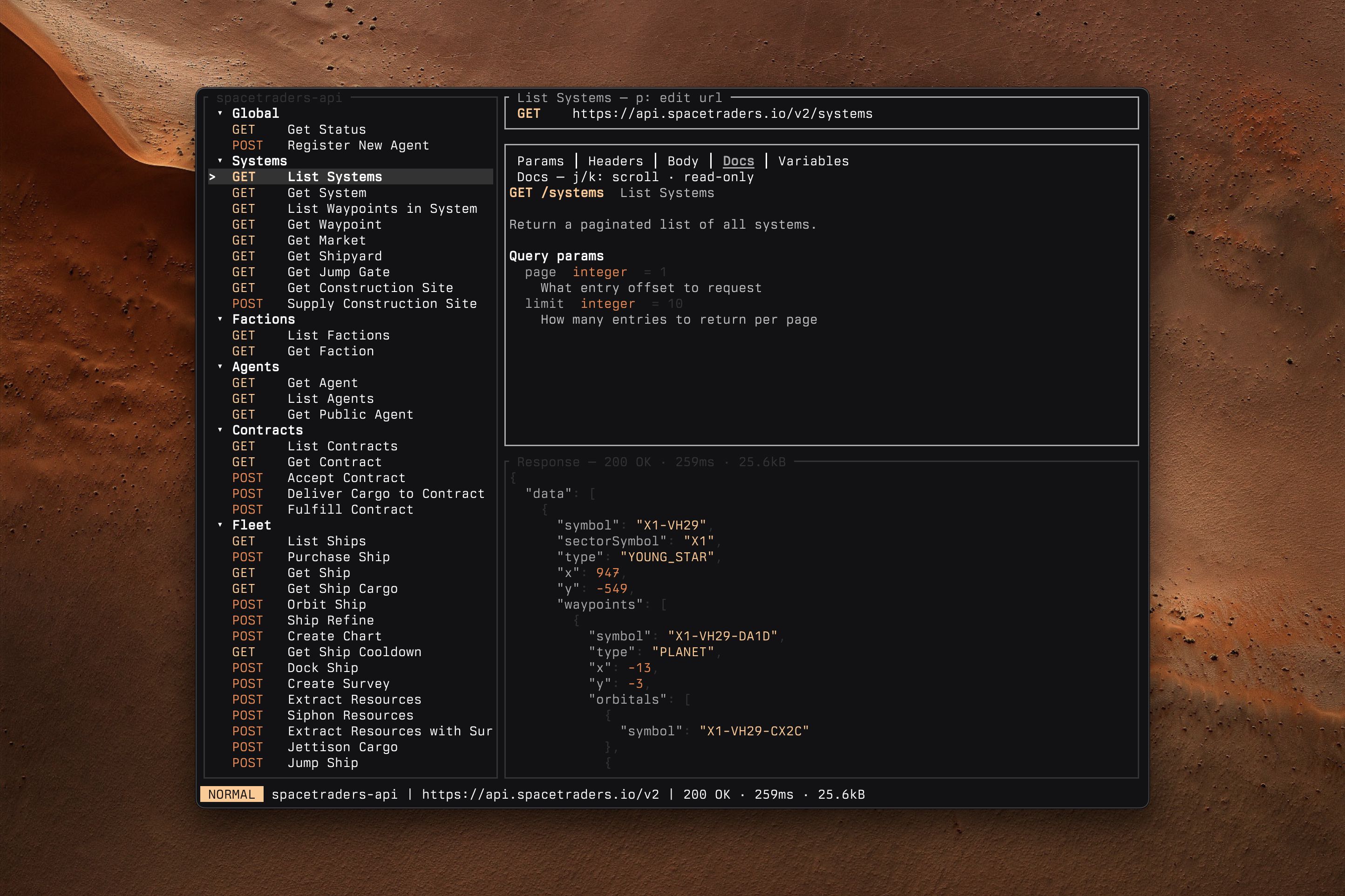 |
| 4 | |
| 5 | Like Postman but it actually works. Terminal native HTTP request builder with OpenAPI support. |
| 6 | |
| 7 | ## Features |
| 8 | |
| 9 | - **OpenAPI 3.x import** — turn a spec (file or URL) into a collection with requests, params, example bodies, servers, and docs prefilled. |
| 10 | - **Ad-hoc collections** — no spec needed; paste a full URL and it's split into server, path, and query params for you. |
| 11 | - **Vim-style TUI** — three panes (requests / editor / response), `j`/`k` navigation, `:` command line, `/` incremental search. |
| 12 | - **Variables** — `{{name}}` from the collection, plus dynamic ones like `{{uuid}}`, `{{timestamp}}`, `{{randomInt(1,100)}}`. |
| 13 | - **Auth per collection** — a fixed bearer token, an API key in a header of your choice, or the OAuth2 client-credentials flow (tokens cached in memory only). Press `A` to configure. |
| 14 | - **Secrets from your shell** — any secret field (bearer token, API key, OAuth client secret) can be a `$(…)` command, resolved at send time, e.g. `$(op read "op://vault/item/field")`. |
| 15 | - **Server switcher** — swap base URLs so requests stay portable across envs. |
| 16 | - **Syntax highlighting** — JSON and XML in both request bodies and responses. |
| 17 | - **Plain JSON storage** — collections live in `~/.config/cielago/collections/`. |
| 18 | |
| 19 | ## Installation |
| 20 | |
| 21 | ### Homebrew |
| 22 | |
| 23 | ```sh |
| 24 | brew install stevedylandev/tap/cielago |
| 25 | ``` |
| 26 | |
| 27 | ### Prebuilt binaries |
| 28 | |
| 29 | Grab a binary for your platform from the [releases page](https://github.com/stevedylandev/cielago/releases), or run the install script: |
| 30 | |
| 31 | ```sh |
| 32 | curl --proto '=https' --tlsv1.2 -LsSf https://github.com/stevedylandev/cielago/releases/latest/download/cielago-installer.sh | sh |
| 33 | ``` |
| 34 | |
| 35 | ### From source |
| 36 | |
| 37 | ```sh |
| 38 | cargo install --path . |
| 39 | ``` |
| 40 | |
| 41 | Or build without installing: |
| 42 | |
| 43 | ```sh |
| 44 | cargo build --release |
| 45 | ./target/release/cielago --help |
| 46 | ``` |
| 47 | |
| 48 | ## Usage |
| 49 | |
| 50 | ```sh |
| 51 | cielago # open the last-used collection in the TUI |
| 52 | cielago open [name] # open a specific collection |
| 53 | cielago import <spec|url> # import an OpenAPI 3.x spec |
| 54 | cielago new <name> [--server u] # create an empty collection and open it |
| 55 | cielago list [-l] # list collections (-l adds counts + paths) |
| 56 | cielago info <name> # servers, counts, auth, groups |
| 57 | cielago edit <name> # edit the collection JSON in $EDITOR |
| 58 | cielago rename <name> <new> # rename a collection and its file |
| 59 | cielago delete <name> [-f] # delete a collection |
| 60 | cielago path <name> # print the collection's JSON path |
| 61 | ``` |
| 62 | |
| 63 | `<name>` matches loosely — `Some API`, `some api`, and `some-api` all resolve to the same collection. |
| 64 | |
| 65 | ### Keys |
| 66 | |
| 67 | | Key | Action | |
| 68 | |---|---| |
| 69 | | `1`/`2`/`3`, `Tab` | Focus sidebar / editor / response | |
| 70 | | `z` | Maximize focused pane | |
| 71 | | `[` / `]` | Previous / next editor tab | |
| 72 | | `Enter` | Send request | |
| 73 | | `/` | Search requests | |
| 74 | | `E` / `A` | Servers / OAuth config | |
| 75 | | `:` | Command line (`:w`, `:q`, `:new`, `:open`, …) | |
| 76 | | `?` | Help | |
| 77 | |
| 78 | Sidebar: `n`/`r`/`d`/`y` new/rename/delete/duplicate, `t` cycle label source. |
| 79 | |
| 80 | Tables: `space` toggle row, `i` edit, `a` add, `d` delete, `m` cycle method, `p` edit URL. |
| 81 | |
| 82 | Body/response: `i` edit inline, `e` open in `$EDITOR`, `j`/`k`/`d`/`u`/`g`/`G` scroll. |
| 83 | |
| 84 | Press `?` in the TUI for the full list. |
| 85 | |
| 86 | ## Development |
| 87 | |
| 88 | ```sh |
| 89 | cargo build |
| 90 | cargo test |
| 91 | cargo clippy --all-targets |
| 92 | cargo fmt |
| 93 | ``` |
| 94 | |
| 95 | ## License |
| 96 | |
| 97 | [MIT](LICENSE) |